Why I Built Watch Next Tonight (How It Works)

I'm Ricardo, a full-stack developer, and I built Watch Next Tonight for an embarrassingly simple reason: I kept losing half an hour every evening deciding what to watch.
The pattern was always the same. I'd sit down around nine with a clear plan to watch something. I'd open a streaming app and start scrolling. Rows of thumbnails, most of which I'd already scrolled past on previous nights. I'd open a second app to compare. Then a third. Somewhere around the thirty-minute mark I'd either settle for a rewatch of something familiar or give up and read my phone instead. The evening I had set aside for a film got spent on the menu for the film.
If you've experienced this, you already know it isn't a willpower problem. It's a structural one. Catalogs are enormous, they're split across services, and every interface is optimized to keep you browsing inside that one service rather than to get you to a decision quickly. I've written more about the psychology behind this in my post on decision fatigue and streaming overwhelm, but the short version is that an abundance of options plus no good way to narrow them is a recipe for choosing nothing.
As a developer, this kind of problem nags at me. The information I needed every night was not secret. What's available, where it streams in my country, what genre it is, how recent it is, whether it's any good: all of that exists in public, well-maintained databases. What was missing was a small tool that asked me two or three quick questions and then just showed me a filtered list. So one weekend I stopped complaining and built one.
What It Actually Does, in One Paragraph
Watch Next Tonight is a free web app that helps you find something to watch in about a minute. There's no account, no sign-up, and nothing to install; you open the site and start. It walks you through a short guided flow: it detects your country (or you pick it yourself) so streaming availability is accurate for your region, you choose the genres you're in the mood for, you choose how recent you want the content to be, and it shows you matching movies and TV shows with posters, ratings, release years, trailers you can watch right in the app, and the streaming services that carry each title where you live. That's the whole product. There's also a separate Trending page if you'd rather see what's popular right now, and it works in dark mode on both phones and desktops.
The Three-Step Flow, and Why Each Step Exists
I want to walk through the flow in detail, partly because it's the heart of the app and partly because each step exists for a specific reason. The design constraint I gave myself was this: every question the app asks has to meaningfully shrink the result set. If a question doesn't cut the catalog down, it's wasting your time and it gets removed.
Step 1: Your Country
The first thing the app does is figure out where you're watching from, either by detecting your location or by letting you pick your country from a list.
This step exists because streaming availability is regional, and ignoring that fact is the single most common way recommendation lists fail. You've probably read a "best movies on streaming right now" article, gotten excited about a title, and then discovered it isn't available in your country at all. Licensing deals differ everywhere: a film that streams on Netflix in the US might be on a completely different service in Brazil and unavailable in Germany. A recommendation you can't actually watch tonight is worse than no recommendation, because it costs you time and ends in frustration.
So country comes first. Everything downstream, especially the "where can I stream this" information on the results, is filtered through your region. If the detection gets it wrong, or you're traveling, or you're using a VPN, you can simply pick a different country manually.
Step 2: Genres
Next, you pick the genres you're in the mood for tonight. Not the genres you like in general. The ones you want right now.
This distinction matters more than it sounds. I love science fiction, but there are plenty of evenings when I absolutely do not want to think that hard. Most recommendation systems build a long-term profile of you and serve that profile, which means they keep handing you "things people like you tend to like" even when tonight-you wants something completely different. By asking the question fresh every time, the app sidesteps that problem entirely. Your Tuesday-night comfort-comedy mood and your Saturday-night thriller mood get treated as the different requests they actually are. If you're curious why mood is a better starting point than taste history, I dug into that in my post on mood-driven viewing.
You can also select multiple genres at once, which I'd encourage. Some of the most interesting results live at the intersections: pick comedy and crime together and you surface a different shelf than either one alone. I wrote about why genre blending unlocks unexpected picks if you want to go deeper on that idea.
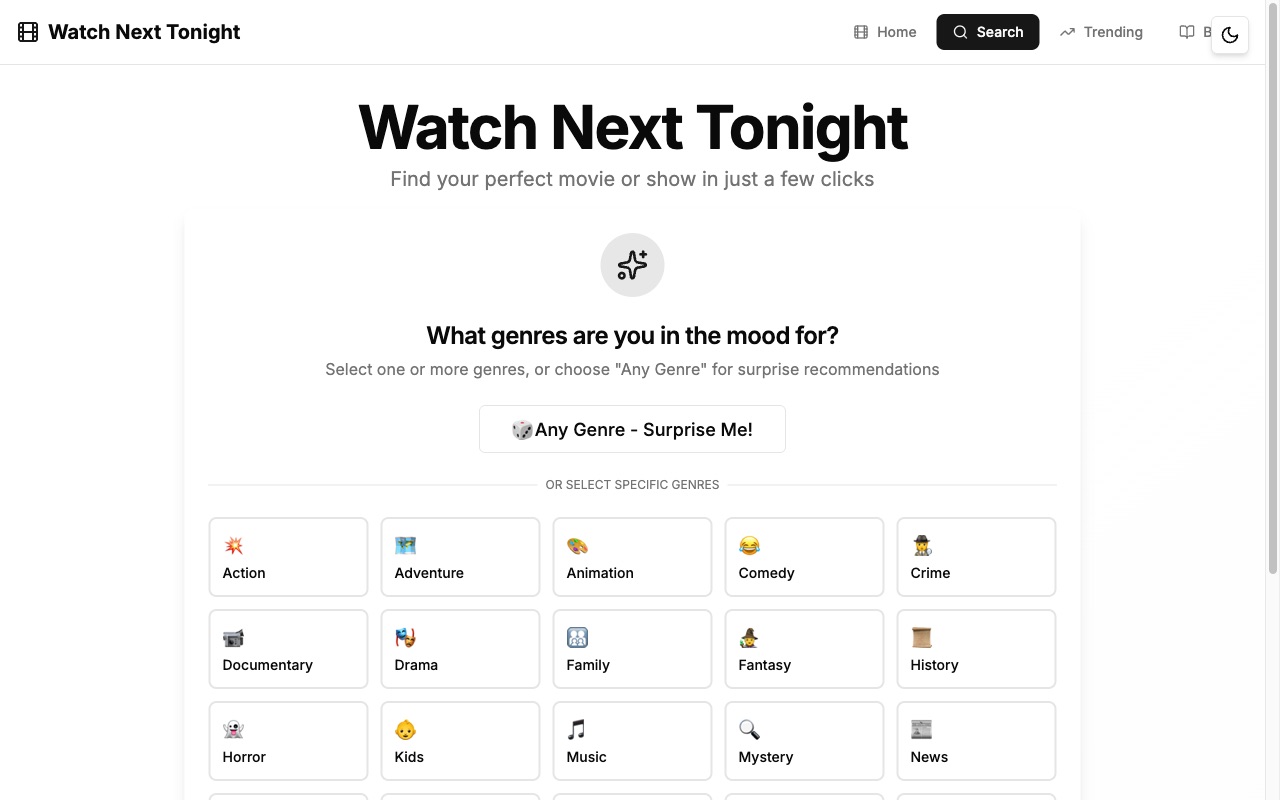
That's the genre grid as it actually looks — every genre gets its own emoji-labeled button, from Comedy to Mystery to Thriller, and you can tap as many as fit your mood.
Step 3: Recency
The last question is how recent you want the content to be, on a range from brand-new releases all the way back to classics.
I added this step after noticing it in my own behavior. Some nights I want to see what everyone's talking about this month. Other nights I specifically want something older, either a classic I've never gotten around to or the kind of mid-budget 2000s film that streaming home pages almost never surface. Default interfaces are heavily biased toward new and licensed-this-month content, so without an explicit recency control, older titles effectively become invisible. One small slider fixes that. If you tell the app you're open to classics, you'll actually see classics.
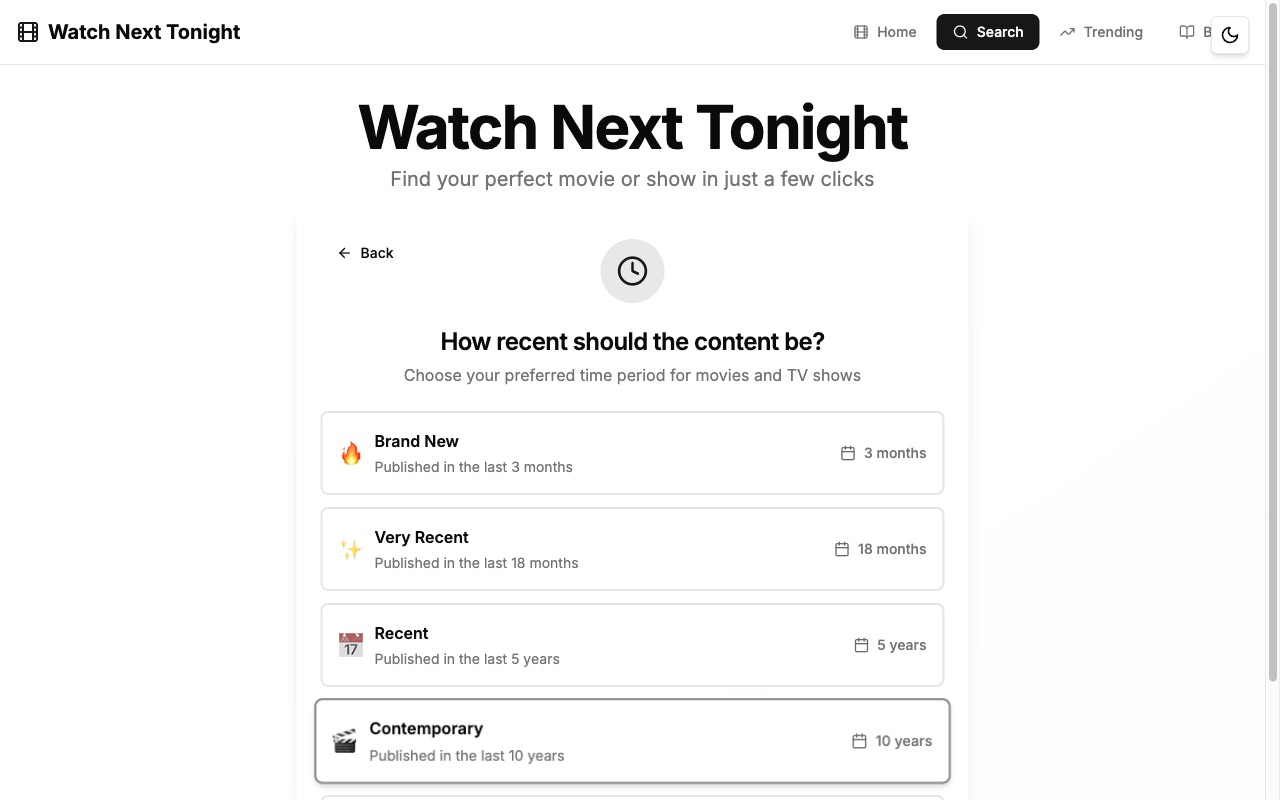
The options run from Brand New (last 3 months) all the way out to Any Time Period, so "open to classics" is a literal button rather than a wish.
The Results
After those three answers, you get a grid of matching movies and TV shows. Each result shows the poster, the rating, and the release year, and you can play the trailer right there in the app without bouncing out to another tab. Crucially, each title also shows which streaming services carry it in your country, so the loop closes: you're not just discovering a title, you're discovering a title you can actually start watching in the next two minutes.
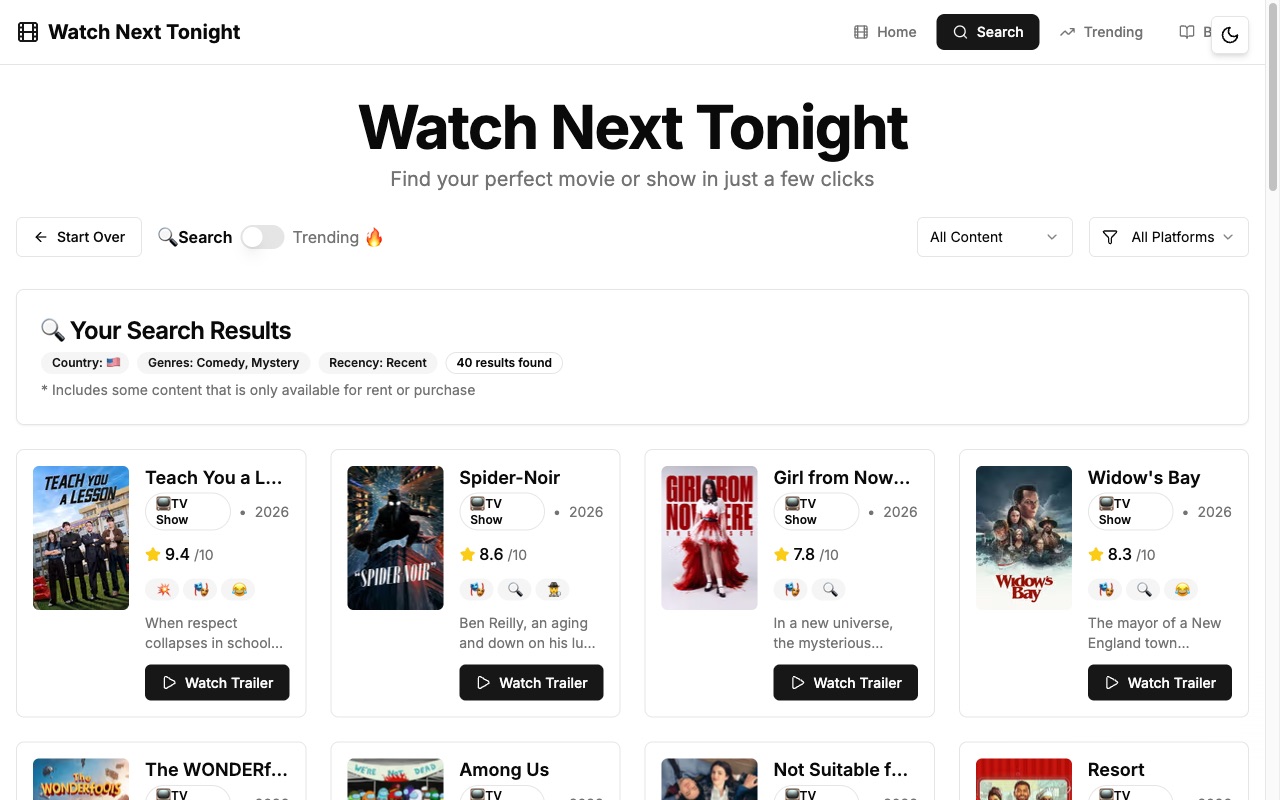
Here, a Comedy + Mystery search in the US came back with 40 results — a grid of posters, each carrying its rating, release year, and a Watch Trailer button.
To make that concrete: if you picked the US, chose sci-fi and thriller, and asked for relatively recent titles, you'd see results along the lines of Dune: Part Two, Silo, or The Creator (2023), each with its rating, year, trailer, and current streaming homes. Pick comedy and classics instead and you're in Some Like It Hot and Monty Python territory. The app doesn't editorialize; it filters and shows you what matches, and you make the final call. If you want to jump straight in, the flow starts at the search page.
Where the Data Comes From
I want to be completely transparent about this, because "where do your recommendations come from" is exactly the kind of question apps tend to answer with vague hand-waving about algorithms.
Watch Next Tonight is built on TMDB, The Movie Database. TMDB is a real, community-maintained database of movies and TV shows that's been around since 2008, and it powers the metadata behind a lot of apps you've probably used. The titles, posters, ratings, release dates, genre classifications, and trailers in Watch Next Tonight all come from TMDB. The ratings you see are TMDB community scores, not my opinion and not a score I compute.
The streaming availability information, meaning the "watch on" services listed for each title, comes from TMDB's watch-provider data, which is supplied by JustWatch. It's generally accurate and updated regularly, but licensing changes constantly, so I'd treat it as a very reliable guide rather than a contractual guarantee. If a title moved services yesterday, there can be a short lag.
What this means in practice: I don't maintain a secret editorial list, and there's no mysterious scoring model deciding what you deserve to see. The app is a fast, opinionated interface over an open, community-maintained dataset. When the data is wrong, it's usually wrong at the source, and TMDB being community-run means it tends to get corrected.
What It Deliberately Doesn't Do
This is the section I most wanted to write, because I think the honest list of what an app doesn't do tells you more than the feature list.
Watch Next Tonight has no accounts and no profiles. It doesn't learn your taste over time. There's no watchlist syncing, no linking of your streaming accounts, and no algorithm quietly building a model of you across visits. The app is stateless: the same inputs give you the same kind of results, whether it's your first visit or your hundredth. When you close the tab, the session is over. It doesn't track your viewing because it can't; it never knows what you actually watched.
Some of that is simply because I'm one developer and the app is young. But most of it is a deliberate choice, and I'd make the same choice with more resources, for three reasons.
First, privacy. The current design barely collects anything because there's nothing to attach data to. No account means no profile of your viewing habits sitting in a database I'd have to secure, monetize, or apologize for later. I find that a much more comfortable thing to ship.
Second, speed. Every feature I listed above would add friction in front of the one job the app has. Sign-up walls, onboarding taste quizzes, "connect your accounts" prompts: each one is a hurdle between you and an answer. The whole point is that you arrive with a question and leave with a shortlist in about a minute.
Third, and this is the one I feel most strongly about: taste-learning algorithms are precisely the thing that creates the rabbit holes I built this to escape. A system that models you from your history and optimizes for engagement will, very effectively, keep you engaged with your history. Tonight's mood is a fresh question, and I think a tool that asks it fresh each time gives more honest answers than one that assumes you're the same person you were last month.
The honest trade-off: if you want an app that remembers you, syncs a watchlist across devices, and refines itself the more you use it, this isn't that app, and I won't pretend otherwise. Simple and stateless is the design, not a gap I'm hiding.
Who It's For, and When to Use It
Concretely, here are a few hypothetical moments where the app earns its keep. These are illustrative scenarios, not user stories; the app doesn't track anyone, so I genuinely couldn't tell you how real people use it even if I wanted to.
Imagine a couple who finished their dinner at 8:45 and have firmly capped their browsing at five minutes, because last Friday the browsing was the whole evening. One of them opens the app on a phone, they agree on two genres and "last few years," and they pick from the first screen of results. If choosing with other people is your recurring struggle, my post on finding harmony in group viewing pairs well with this.
Or imagine someone who just signed up for a new streaming service trial and wants to know what's actually worth watching on it in their country before the trial ends, rather than what the service's own home page is promoting this week. Filtering by their real mood and seeing availability per title gets them there faster, and helps them get more out of the subscriptions they're already paying for.
Or imagine someone on a Sunday afternoon with no particular mood at all who just wants to know what the rest of the world is watching right now. That person skips the guided flow entirely and goes straight to the Trending page.
The common thread is a person who wants to spend their evening watching rather than choosing, and who doesn't want to create yet another account to do it.
Frequently Asked Questions
Is Watch Next Tonight free?
Yes, completely. There's no paid tier, no trial, and nothing to unlock. It's a web app, so there's also nothing to install; it runs in your browser on phones and desktops, with dark mode included.
Do I need an account?
No. There's no sign-up, no login, and no profile. You open the site, answer the three questions, and get results. The app is stateless by design, which also means there's no stored history of what you searched for or watched.
Which countries does it work in?
The app detects your country automatically, or you can pick it manually from the list. Streaming availability data exists for a large number of countries through TMDB's watch-provider data, so the "where to stream" information adjusts to wherever you are. Coverage and accuracy are strongest in larger streaming markets, but the core flow works regardless of where you're located.
Where does the data come from?
All titles, posters, ratings, release dates, and trailers come from TMDB (The Movie Database), a community-maintained database that's been running since 2008. The streaming-availability listings come from TMDB's watch-provider data, supplied by JustWatch. I don't editorialize the results or inject sponsored titles.
Try It, and Tell Me What's Broken
That's the whole story. I got tired of thirty-minute scrolling sessions, the data to fix it already existed in the open, and I'm a developer, so I built the small tool I wished existed. It asks three quick questions and shows you what matches, where you can stream it, with the trailer one tap away.
If that sounds useful, try it tonight. The flow takes about a minute, and the worst case is that you're back to your usual scrolling with sixty seconds lost.
And because this is a small project by one person rather than a polished product from a big team, feedback genuinely shapes it. If a result looks wrong for your country, if a step feels clumsy, or if there's something simple the app should do that it doesn't, tell me through the contact page. I read everything that comes in.
About the Author
Ricardo D'Alessandro
Full-stack developer and entertainment technology enthusiast with over a decade of experience building innovative web applications. Passionate about creating tools that simplify decision-making and enhance the entertainment experience.
Watch Next Tonight combines my love for cinema and technology, leveraging modern web technologies and AI to solve a problem I face every evening: finding the perfect thing to watch without spending 30 minutes browsing.